
Audit Overview
Your store's untapped revenue potential — and how to unlock it
Why We Created This Audit
We analyzed https://choplocal.com the same way we've audited 350+ e-commerce stores — looking for the specific gaps between your current experience and what top-performing Food & Beverage (Multi-Vendor Meat Marketplace) stores deliver. Every finding in this report is a revenue opportunity backed by industry data and competitive benchmarks.
What We Analyzed
- UX & Conversion Design13 findings
- Performance & Speedvs 3 competitors
- Technology & App StackPlatform + 13 apps
- Industry BenchmarksFood & Beverage (Multi-Vendor Meat Marketplace)
Pages Analyzed
- Homepage3 findings
- Collection Pages2 findings
- Product Pages (PDP)5 findings
- Cart & Checkout3 findings
 This audit was prepared by Growisto — a CRO-led Website development team behind 167% conversion growth for Atomberg, 46% CR lift for TyresNmore, and 350+ e-commerce projects.
UX & Conversion Findings
Page-by-page analysis with visual comparisons against top Food & Beverage (Multi-Vendor Meat Marketplace) stores
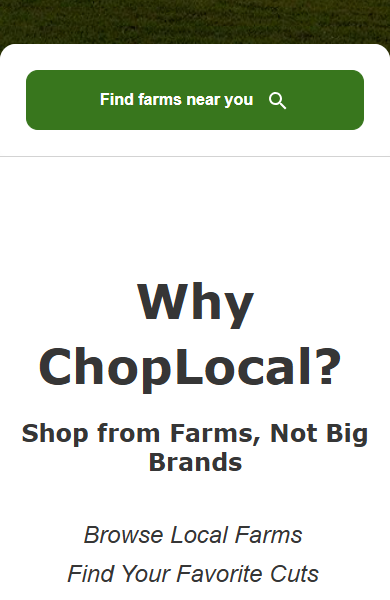

- The Why-ChopLocal section on the homepage is a 4-item text list — Browse Local Farms, Find Your Favorite Cuts, Support Farmers & Butcher Shops, Experience Farm-Fresh Meat — rendered as plain typographic bullets with no icons or imagery.
- For a category that competes on trust and provenance (fresh meat direct from farm), the value prop is the single most important above-the-fold message. Text-only bullets get skimmed; icons plus a one-line caption get parsed at a glance.
- Every mature meat marketplace we benchmarked (Crowd Cow, Grass Roots Coop) leads with a visual USP row — farm icon, cut icon, cold-chain shipping icon, certification icon — rather than a text list.
- This is a low-effort, high-visibility win — no engineering required, just an SVG icon set plus a light re-layout of an existing section.
- Replace the 4-bullet text list with a 4-icon horizontal row: Local Farms (farm icon), Farm-Fresh Meat (steak icon), Meet Your Farmer (farmer icon), Free Shipping $75+ (truck icon). Each icon gets a 2-3 word label.
- For each icon-label pair, include a 1-line micro-description below (e.g., From family farms within your region — never mass-market brands).
- A/B test the icon block against the current text bullets — expect stronger scroll-past-fold behaviour and higher recall of the marketplace's four selling points.
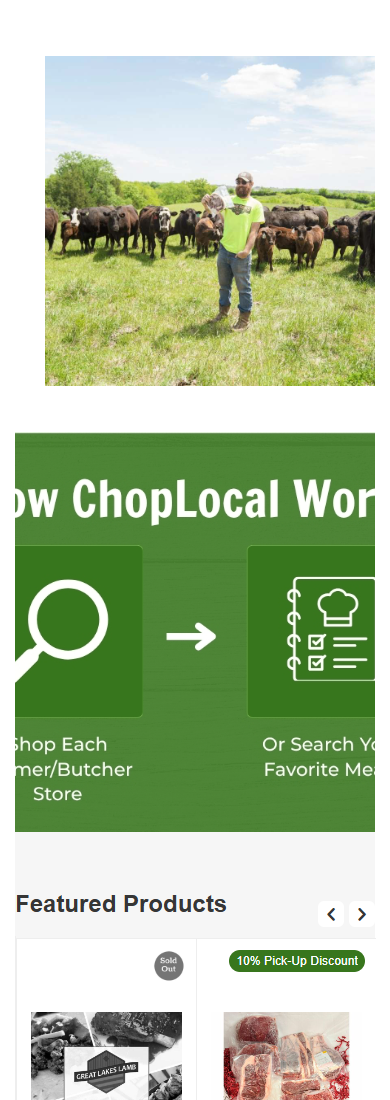

- The Featured Products, Bestsellers, and On Sale carousels on the homepage each show product cards with image + name + price (and sometimes a discount badge). None of them show which farm or vendor the product comes from.
- The individual PDP does surface the vendor (Pleasant View Beef for the Michigan Steak Bundle we inspected), so the attribution exists in the CS-Cart data model — it is simply not surfaced on cards.
- For a marketplace whose pitch is meat direct from named farmers, not big brands, omitting the farm name at browse-stage flattens the marketplace back into a generic e-commerce listing. The shopper has to click a card to discover it is from a specific farm.
- Crowd Cow surfaces the farm name (e.g. Little Belt Cattle Co. — Martinsdale, MT) above the product title on every card, because farm identity is the differentiator.
- Add a small from-[Farm Name] line above each product name on cards — a distinct colour (link teal) and small caps or italic differentiates it from the product title.
- Optionally link the farm name to that farm's storefront page — turns every product card into a marketplace-discovery entry point.
- For the Bestsellers row specifically, consider replacing Gift Certificates as the lead card (bestseller lists that lead with gift cards feel weak) — surface a real high-velocity SKU instead.
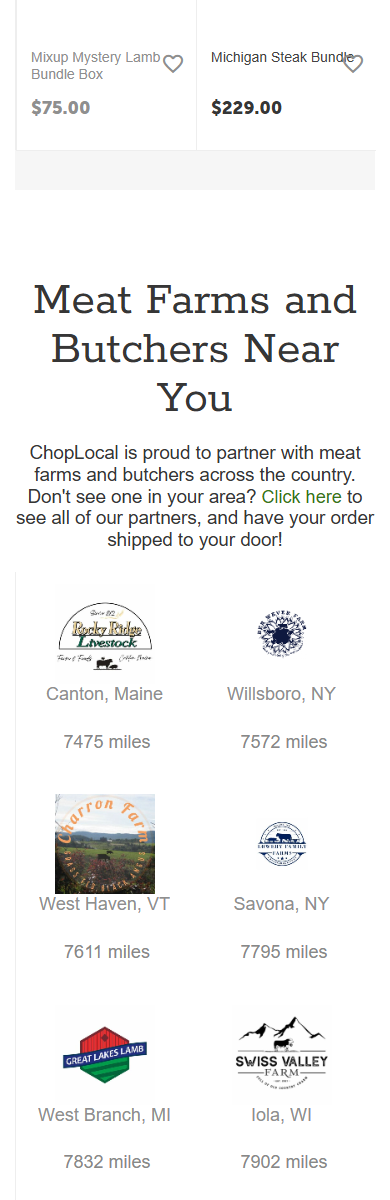
- The Meat Farms and Butchers Near You section on the homepage lists 40+ vendor cards in a 2-column mobile grid — no filter, no sort, no in-grid search. The only way to browse is linear scroll.
- Each card shows farm logo + city/state + distance-in-miles. That is useful data — but the shopper cannot act on it: no way to say show me only Iowa farms, show me farms that ship (not just pickup), or sort by distance ascending.
- Search across farm names is not visible in the section — the site-wide search in the header returns products, not farms specifically.
- For a marketplace, the farm/vendor directory is the second-most-important browse surface after products. Making it a scroll-only wall of 40+ logos hides the depth of the supply side.
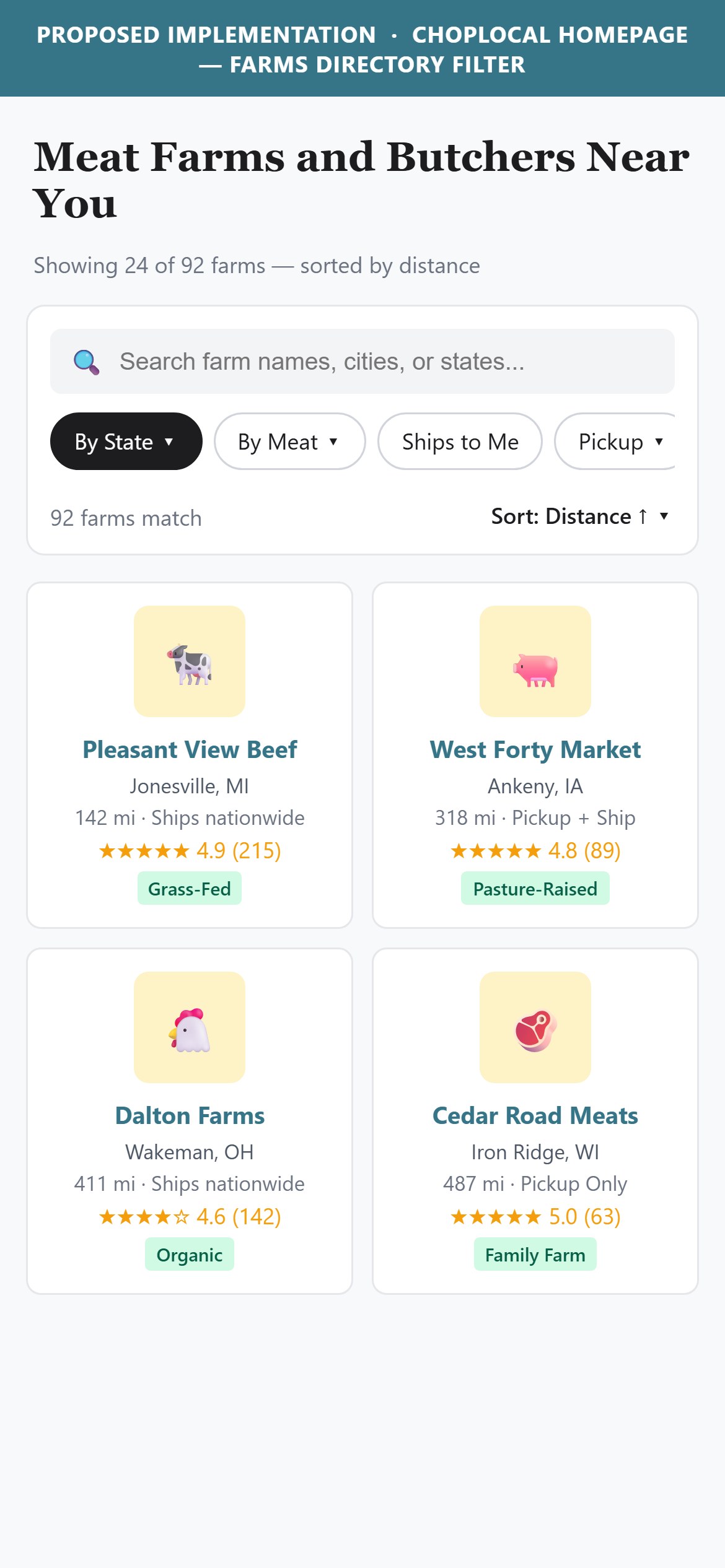
- Add filter chips above the grid: By State, By Meat Type (beef/pork/poultry/lamb), Ships to You, Pickup Available. Multi-select, sticky across scrolls.
- Add a sort dropdown: Distance (nearest first), A-Z, Newest, Most Popular.
- Add an Explore-all-farms button that goes to a full farms-directory page with more powerful filtering (state map, farm type, certifications).
- Consider a compact featured-farm-of-the-week card at the top of the grid to reduce visual monotony of the logo wall.
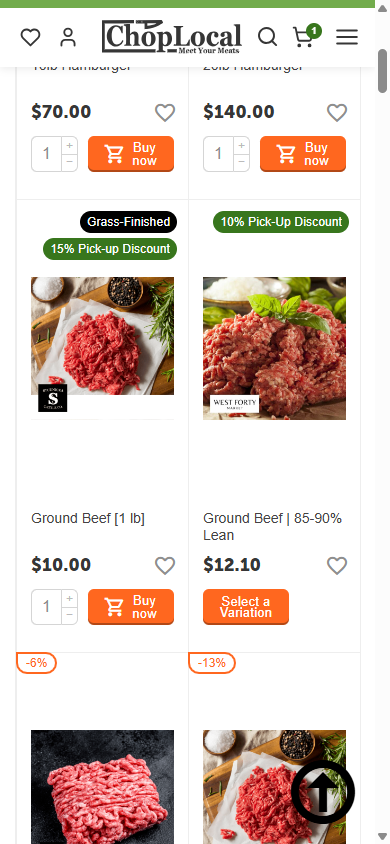
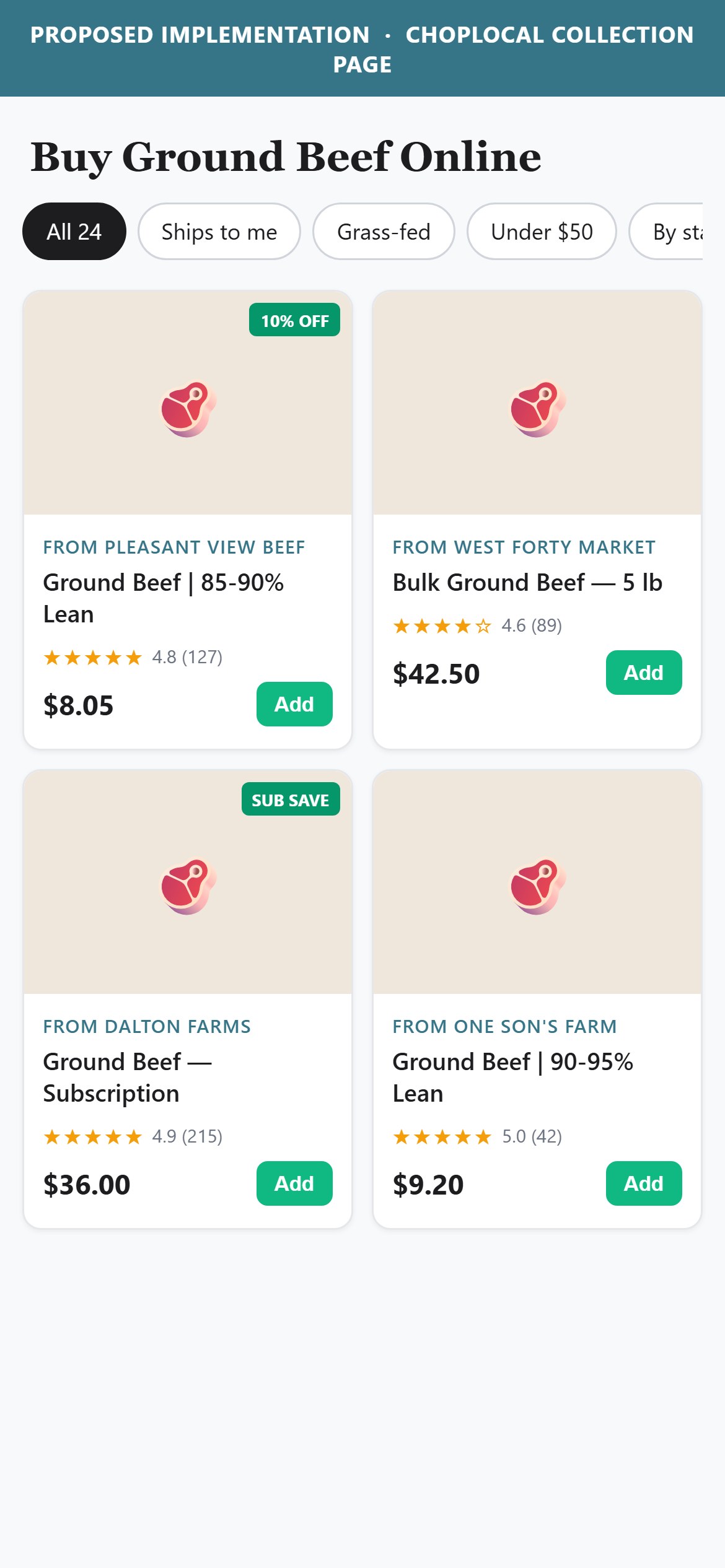
- The Ground Beef category page (/local-beef/beef-ground-beef/) presents products in a 1-column mobile grid — each card has product image, product name, price, and a quick-add Add-to-cart button. That is a strong card structure — but no star rating or review count is visible on any card.
- The PDP does have a Write-a-review link near the title, suggesting a reviews infrastructure exists (and vendor-level reviews would be trackable too). Not surfacing ratings on cards means every product looks equally new, equally untested.
- In a marketplace where the same cut (e.g., Ground Beef) is sold by many different vendors, ratings become the tie-breaker for the shopper deciding which farm to buy from. Ratings on cards is what makes the marketplace feel curated rather than random.
- ButcherBox and other US meat marketplaces surface a star rating + review count on every card, plus a farm-level rating in the vendor directory.
- Add a compact rating widget to every product card: 5 filled/empty stars + review count in small text (e.g., 4.8 (24)). Position immediately below the product name.
- For products with no reviews yet, show the vendor's aggregate rating instead (Sold by Pleasant View Beef — 4.8 (215)).
- Also add rating badges to the Meat Farms and Butchers Near You cards on the homepage — a farm rating (rolled up from all its products' reviews) is more meaningful than a distance number.
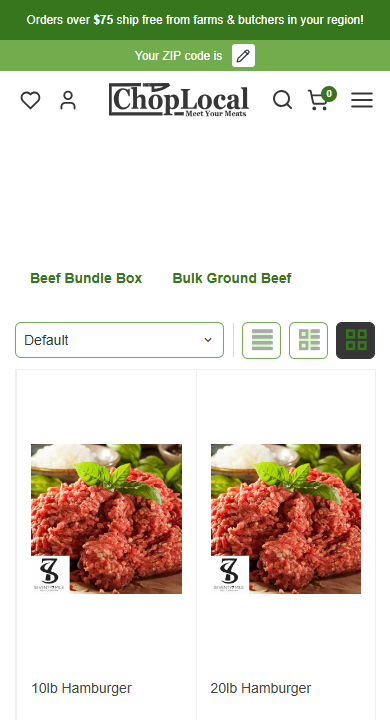
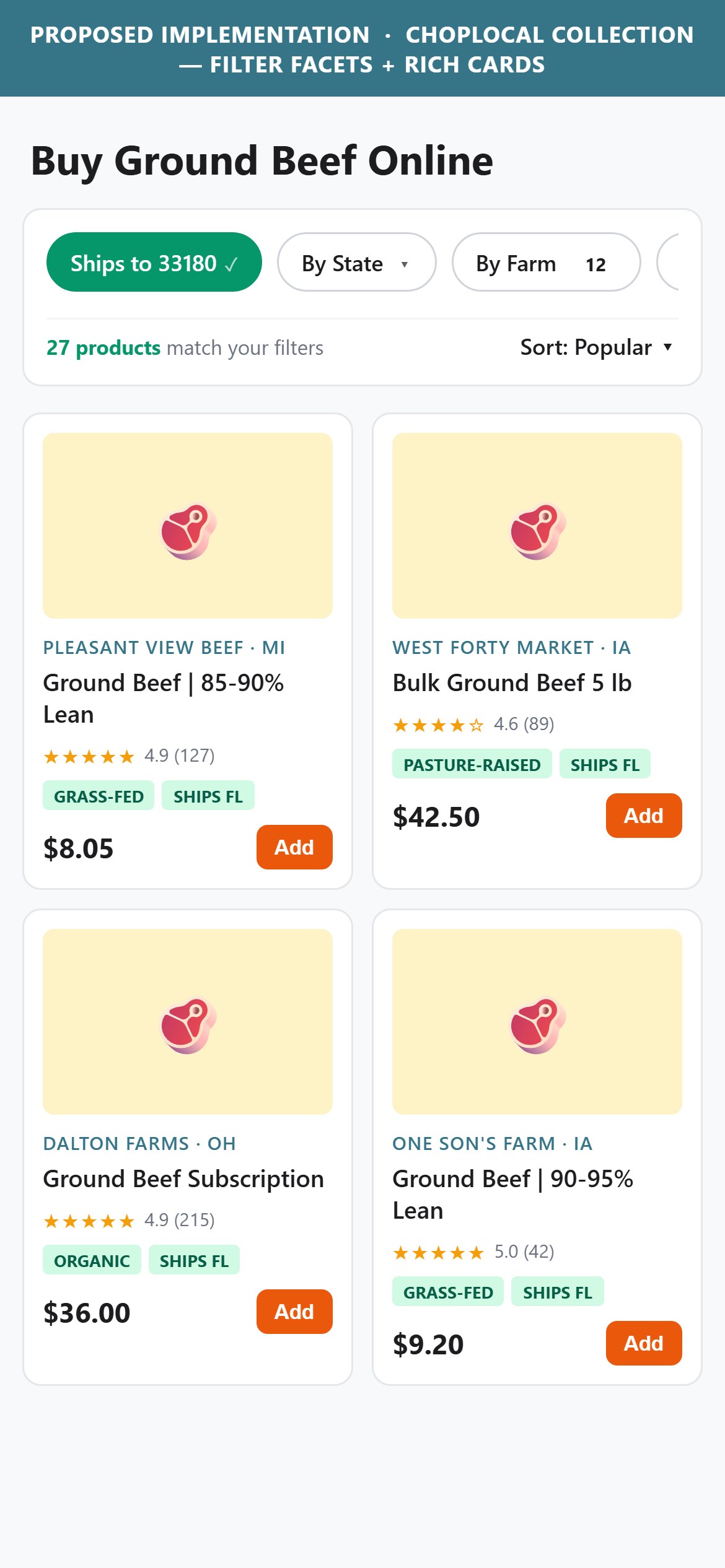
- The Ground Beef category page (/local-beef/beef-ground-beef/) shows two sub-category chips (Beef Bundle Box, Bulk Ground Beef), a Default sort dropdown, and a 3-view-layout toggle — but no filter facets at all. There is no by-farm, by-price, by-feed-type, by-shipping-eligibility, or by-certification filter surfaced to the shopper.
- The CS-Cart platform DOES support these — the URL query params ?sort_by=price&sort_order=asc, ?sort_by=popularity, ?items_per_page=48, ?layout=products_multicolumns all resolve when passed manually. The infrastructure exists; the shopper-facing UI is what is missing.
- In a multi-vendor marketplace, the same cut (e.g., Ground Beef) is sold by many farms at different price points, from different states, with different feed practices. Without filters, the shopper is stuck browsing linearly through vendors they may not care about.
- Ships-to-my-region filtering is especially critical — a shopper in Florida sees many products they cannot actually buy, and only discovers the block at cart-add. That's a designed-in dead-end that filters would prevent.
- Add a filter chip strip (or filter drawer on mobile) with these facets, above the product grid: By State, By Farm, Ships to My ZIP, Feed Type (Grass-Fed / Grain-Finished / Pasture-Raised), Certifications, Under $50 / $50-100 / $100+.
- Default the Ships-to-My-ZIP filter to ON — respecting the shopper's location prevents dead-end product discovery. Provide a Show all farms toggle for shoppers who want to browse pickup options.
- Expand the sort dropdown beyond Default: Popular, Price Low-High, Price High-Low, Highest Rated, Distance (Nearest First), Newest. Preserve the URL param structure that already exists so state is shareable and back-button-friendly.
- Show a 'X products match your filters' counter above the grid — helps shoppers understand the impact of each filter selection and encourages further narrowing.

- The Michigan Steak Bundle PDP shows a Write-a-review link near the title but no aggregate rating, no review count, no review block on the page. If any customers have reviewed this product, none of it surfaces on the PDP.
- Reviews are non-negotiable for a meat category — buyers cannot inspect the product physically before ordering, so third-party validation carries the trust weight. Missing reviews on PDP is the largest single conversion gap in the audit.
- Even a bare Be-the-first-to-review state with a 5-star rating widget is more trust-building than the current invisible-until-clicked state.
- Grass Roots Coop shows the aggregate rating (e.g. 4.8 stars), the total review count, and a full distribution histogram (5-star through 1-star) at the bottom of every PDP.
- Install a review widget (Judge.me, Loox, Yotpo, or CS-Cart's native reviews module) and enable it site-wide on all PDPs.
- Show aggregate rating + review count directly under the product name (e.g., 4.7 (32 reviews)), linked to a full review section further down the page.
- Add a bottom-of-PDP review block with individual customer reviews, review photos (encouraged via post-purchase email), verified-buyer badges, and a sort/filter (most recent, most helpful, by rating).
- Kickstart the review flywheel: email past 90 days of buyers of the top 20 SKUs asking for reviews, with a $5 credit incentive. Seed each top SKU with 5-10 reviews before any paid traffic hits.

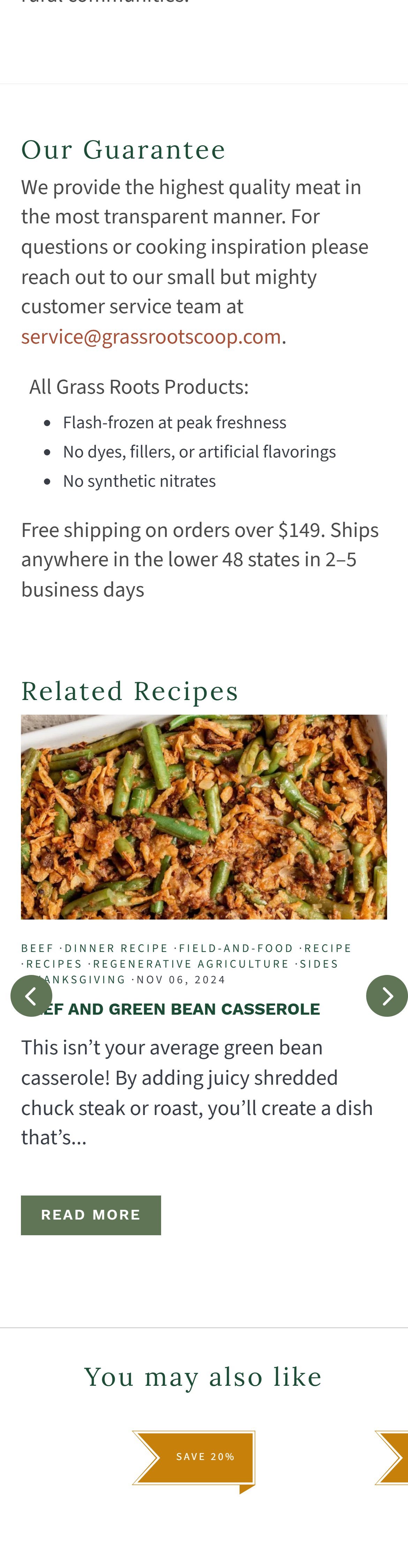
- The Michigan Steak Bundle PDP has ~321 words of body content total: a 3-sentence description, a bundle-contents list, and an About Pleasant View Beef section that is mostly generic about-ChopLocal boilerplate. That is it.
- The description does NOT include: cooking method suggestions (grill / sear / sous-vide), recommended internal temperature, portion-per-person guidance, storage / thaw instructions, or recipes.
- For a $229 bundle (2 Ribeye + 2 Porterhouse + 2 Sirloin + 1 NY Strip), a shopper is being asked to commit at premium-restaurant price levels. Missing cooking guidance leaves them wondering if they will cook a $58 ribeye badly. That doubt is a conversion killer.
- Crowd Cow includes a How-to-cook-this-cut block on every steak PDP; Grass Roots Coop pairs every steak PDP with a Related Recipes block that links to their in-house recipe library. Either approach is a category standard.
- Add a How-to-Cook-This-Cut section below the description on every meat PDP: 2-3 recommended methods, target internal temperature, roughly two sentences on prep and rest.
- Add a Recipes-with-this-cut block — link to 3-5 blog posts from ChopLocal's existing content library (Learn More about Our Meats on the homepage is doing exactly the right thing — it just is not discoverable from PDPs).
- Expand the About-[Vendor] section into a proper farmer story — 2-3 farmer photos, a paragraph on their practices (grass-fed, humane, generations-on-the-land), certifications visible as icons. This is the marketplace's storytelling superpower — currently the section is just 5-7 lines of vendor-agnostic text.
- Consider a short (30-second) video slot on the PDP — even a static farm image + farmer quote works if video is a lift.
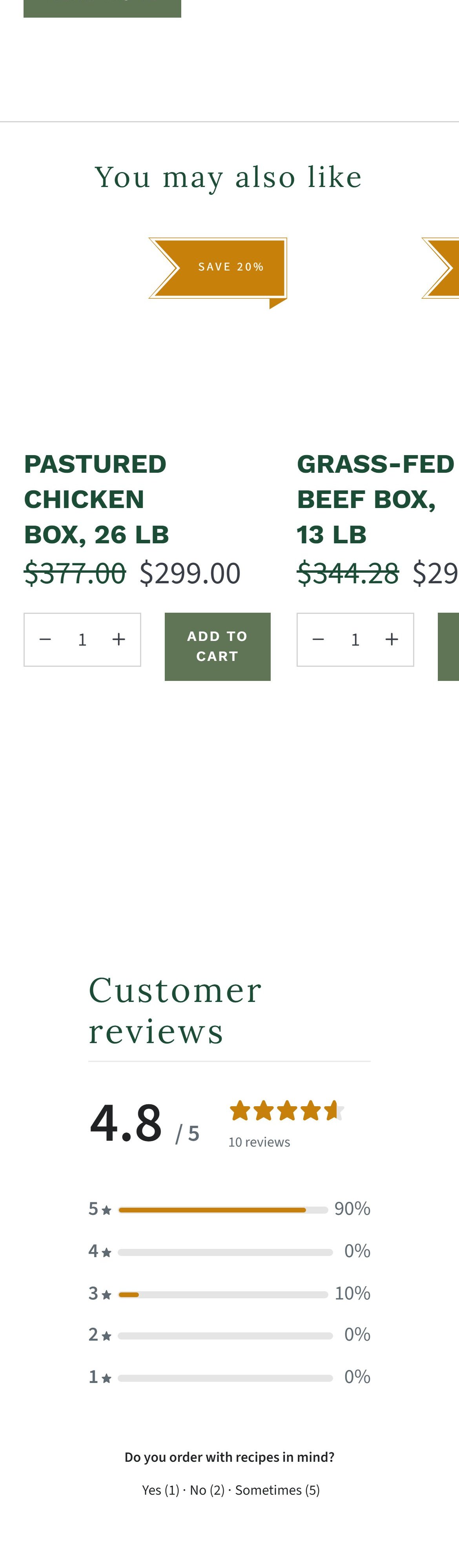
- The Michigan Steak Bundle PDP has no related products, frequently bought together, you may also like, or more-from-Pleasant-View-Beef section anywhere on the page.
- For a $229 bundle purchase, natural cross-sells are obvious: sides (bacon, sausage), pantry (rubs, marinades, tallow), the vendor's other bundles, gift add-ons. None are surfaced.
- Cross-sell on PDP is the most reliable AOV lever in e-commerce — it multiplies the value of every visitor who has already declared purchase intent by opening a product page. Missing this is leaving revenue on the table on every PDP session.
- For a multi-vendor marketplace, the cross-sell is particularly powerful when scoped to more from this farm — it deepens the vendor relationship AND increases the shopper's connection to the specific farm.
- Add a More-from-Pleasant-View-Beef carousel on every vendor's PDPs — 4-6 products from the same farm, in a horizontal-scroll mobile format.
- Add a Frequently-Bought-Together block using CS-Cart's purchase-history data — 3 SKUs that customers of THIS product also bought.
- Add a Complete-Your-Grill-Box or Perfect-Sides block for meat PDPs — cross-category recommendations (rubs, marinades, sides) that increase AOV.
- For products that are part of a series (e.g., beef bundles at different price tiers), a Compare-bundles block linking to nearby bundles.
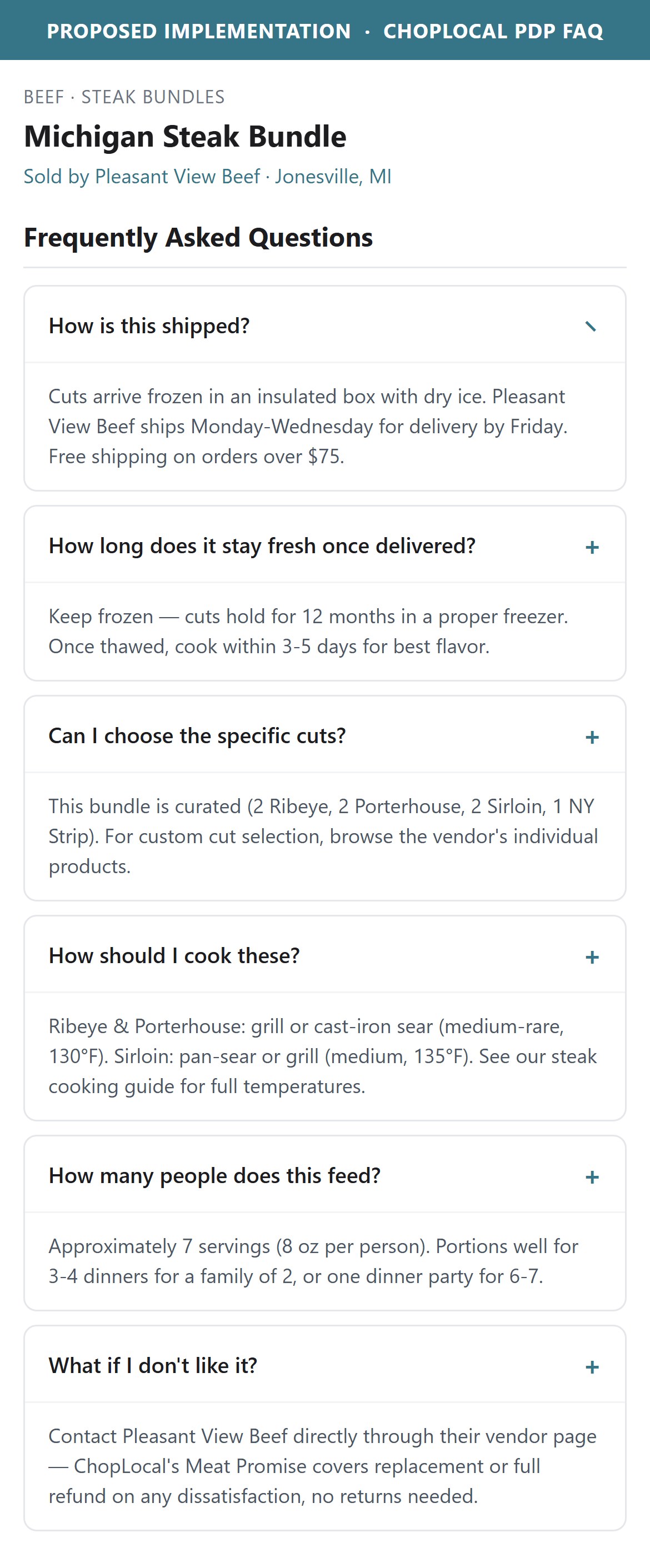
- The Michigan Steak Bundle PDP has no FAQ section. It has an Order Fulfillment link and a Want-to-know-more-about-the-farm-or-product Q&A prompt — but no visible FAQ list addressing common purchase objections.
- By contrast, the Ground Beef category page has an FAQ About Ground Beef section. Category-level FAQs help SEO and category education, but a shopper on a PDP is one click deeper — they need product-specific answers (shipping thaw state, expiry post-delivery, portion-per-person, cooking method) at the point of decision, not on the category page they came from.
- The FAQ pattern is not exotic. It exists in CS-Cart's stock capabilities and can be surfaced per-SKU or as a vendor-configurable block. The absence pattern-matches to a design decision, not a data gap.
- Bonus: FAQ text is high-value SEO content — Google surfaces FAQ blocks in rich results for meat + cut queries.
- Add a 3-6 question FAQ accordion below the description on every meat PDP. Universal template: How is this shipped? How long does it last? Can I freeze it? How is it packaged? How do I cook it?
- For vendor-specific answers, allow the vendor to override 2-3 questions per PDP with their own text (CS-Cart custom fields).
- Bonus: FAQ text is high-value SEO content — Google surfaces FAQ blocks in rich results for meat + cut queries.
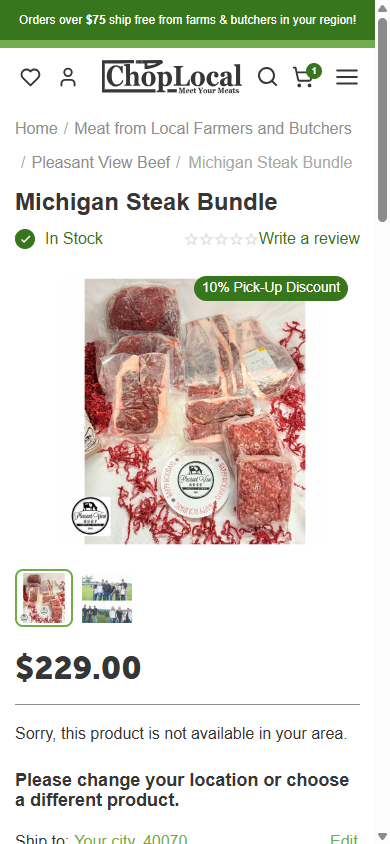

- The Michigan Steak Bundle PDP description contains Dry-Aged Beef and Antibiotic free — real, meaningful differentiators. But they are buried inside a prose paragraph in a low-contrast description block below the fold.
- Above the ATC, there are zero visual icons or badges. The only visual signals near the ATC are: an In-Stock green pill, the price, quantity selector, and Add-to-Wish-List link.
- Meat-buying is a trust-heavy purchase — the shopper is scanning for reassurance signals (USDA, grass-fed, humane, antibiotic-free, pasture-raised) as they read the price. Text-only mentions require reading; icon badges are absorbed at a glance.
- Grass Roots Coop surfaces a 4-icon cert row directly on every PDP (Pasture Raised, Fair Wages / Small-Scale, Pure Flavor, No Antibiotics/Hormones) — this is the meat-category standard.
- Add a 3-5 icon row directly below the price on every PDP: Grass-Fed, Antibiotic-Free, Pasture-Raised, Dry-Aged (per SKU), USDA Inspected. Icons should be simple line-art, monochrome.
- Make icons vendor-controllable (CS-Cart product fields) — each vendor picks which certs apply to their product. This also creates a filter surface later (show me only grass-fed products).
- Show a small cert legend / tooltip on hover explaining what each badge means. Not every buyer knows the difference between AGA and USDA.
- Add a Verified-by-ChopLocal meta-badge for products where the marketplace has physically verified the farm's claims — becomes a competitive moat over ranking-by-vendor-claim.
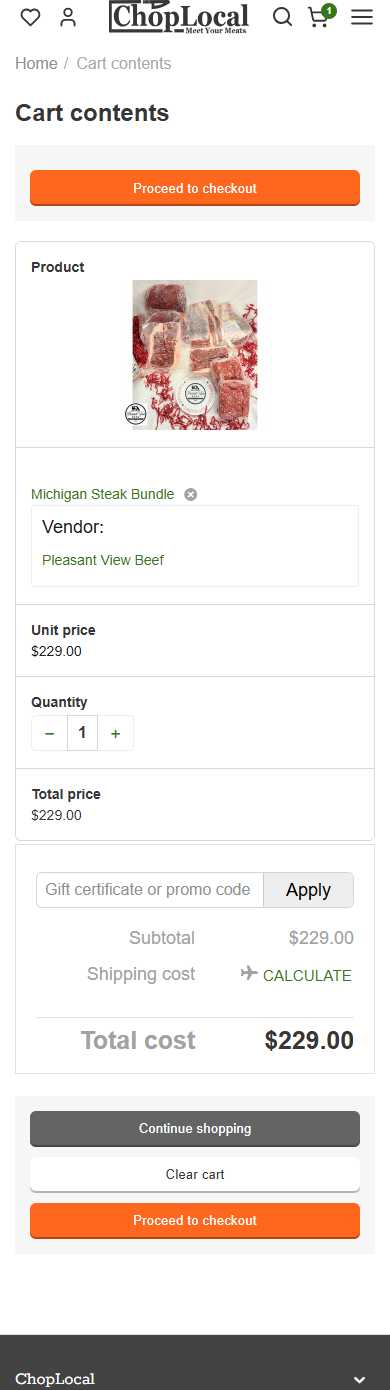
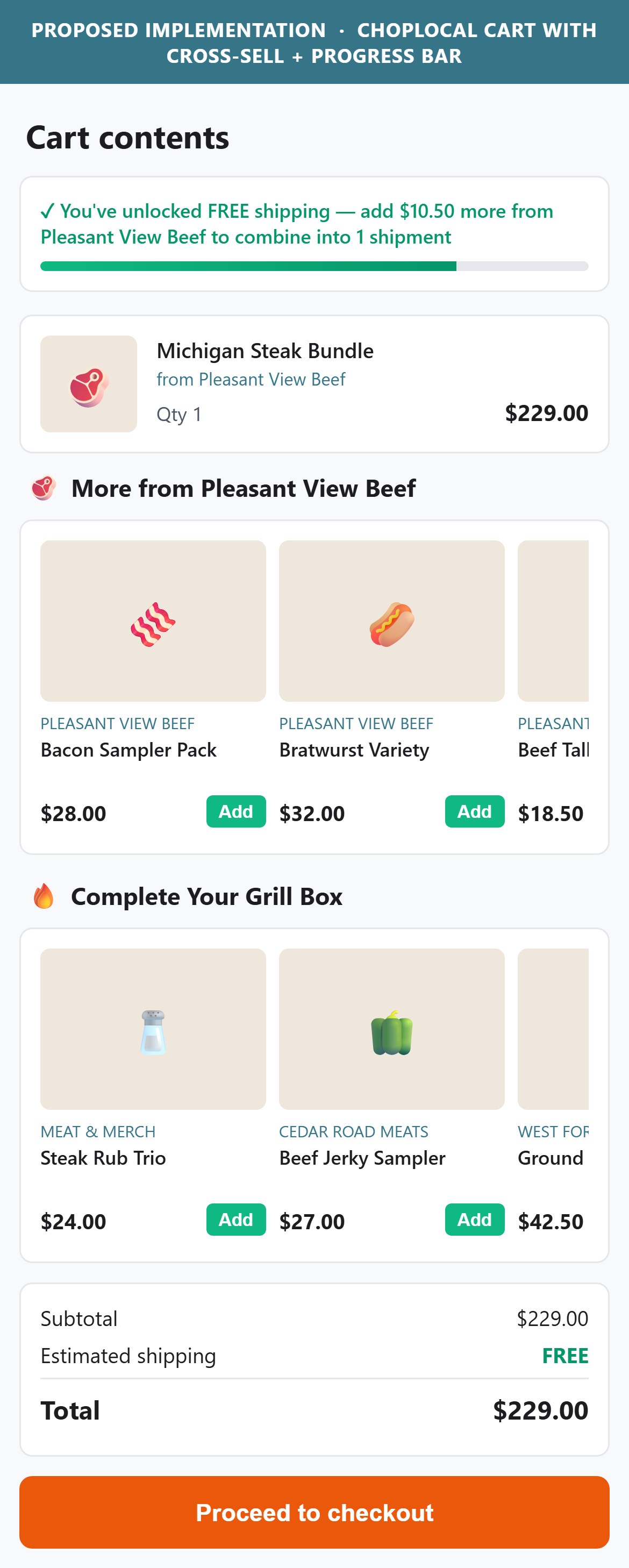
- The ATC-triggered cart drawer displays: product image, name, quantity, unit price, cart subtotal, and two CTAs (Continue shopping / Checkout). No recommended products, no add-ons, no complete-your-box section.
- The /cart page is equivalently minimal: line item, coupon input, shipping calculator link, totals, and 3 buttons. No you-may-also-like, no suggested add-ons, no more-from-Pleasant-View-Beef.
- For a $229 cart, natural cross-sells are obvious and low-friction: seasoning packs, marinades, sides (bacon, sausage), similar-vendor bundles. Every extra $10-$40 added at this stage is pure margin — the shopper is already committed to checkout.
- Cart cross-sell is a well-established standard in US DTC food — it is the single highest-leverage AOV move available and applies cleanly to a marketplace via more-from-this-farm recommendations.
- Add a horizontal-scroll You-may-also-like carousel to the cart drawer — 3-4 products chosen by CS-Cart's product-affinity data or hand-curated per vendor.
- On the /cart page, add a full Frequently-added-with-your-order section below the line items — 4-6 products, quick-add (no PDP visit required).
- Prioritise same-vendor cross-sells first (more from Pleasant View Beef) — these compound the vendor relationship and are more likely to combine into a single-shipment order.
- For meat-specific cross-sell: pair steak orders with rubs/marinades, ground beef with buns/cheese, jerky with variety-pack samplers.
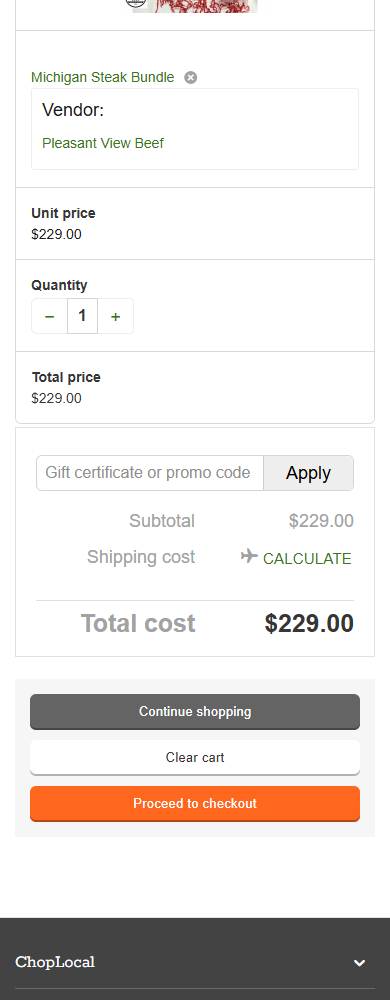
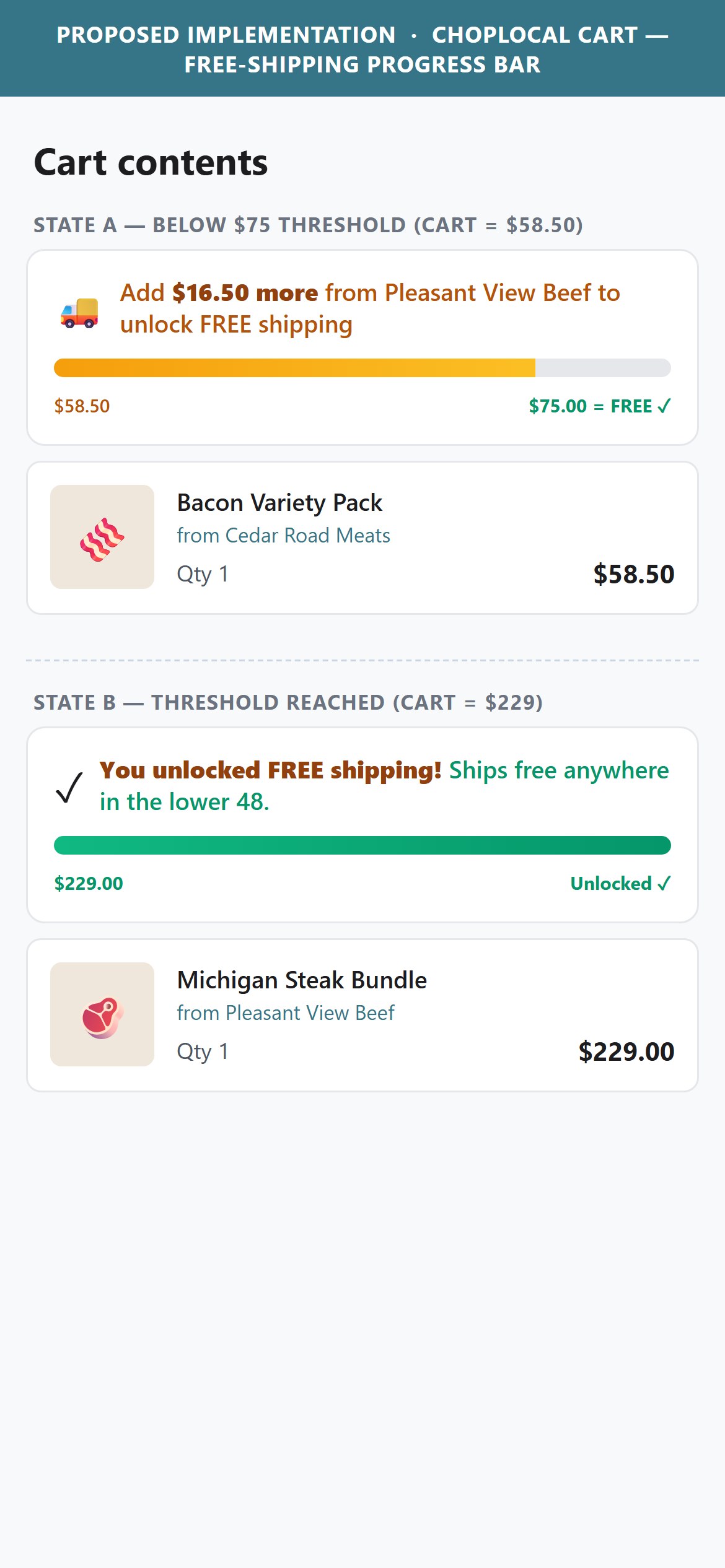
- The site has a clear $75 free-shipping threshold: the announcement bar reads FREE SHIPPING FOR ORDERS OVER $75 IN YOUR REGION on the homepage and Orders over $75 ship free from farms & butchers in your region on the cart page. This is well-communicated as a policy — but nowhere in the cart interface does the shopper see visual progress toward the threshold.
- For a shopper with, say, $58 in their cart, showing them Add $17 more to unlock free shipping with a progress bar is the single most effective AOV nudge in e-commerce.
- The current cart page shows Shipping cost: [airplane] CALCULATE as a link — the shopper has to click to even see what shipping costs. That is the opposite of the goal: hidden shipping is a top cart-abandon reason.
- Cold-chain shipping economics do complicate the threshold logic (some vendors have different minimums, some ship at flat rates) — but the marketplace-level $75 rule is already published, so surfacing progress against it is safe and honest.
- Add a progress bar to both the cart drawer and the /cart page: visual bar filling toward $75, with text Add $X more to unlock free shipping when below the threshold, and You unlocked free shipping! with a celebratory microcopy when above.
- Show shipping cost inline once ZIP code is known — remove the CALCULATE click-required pattern. Default to Estimated shipping: $X.XX (or FREE if you add $X more).
- Repeat the progress bar on the PDP near the ATC when items are already in cart — reinforces the nudge before the shopper closes out.
- Use the CS-Cart shipping estimator API to pre-calculate the delta as items are added; refresh via AJAX without page reload.
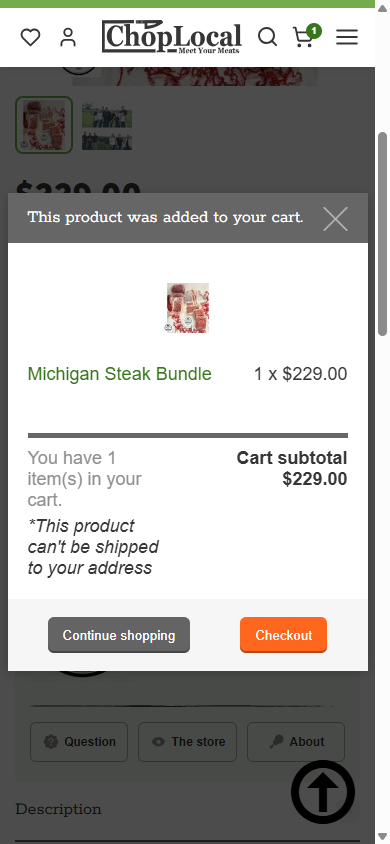
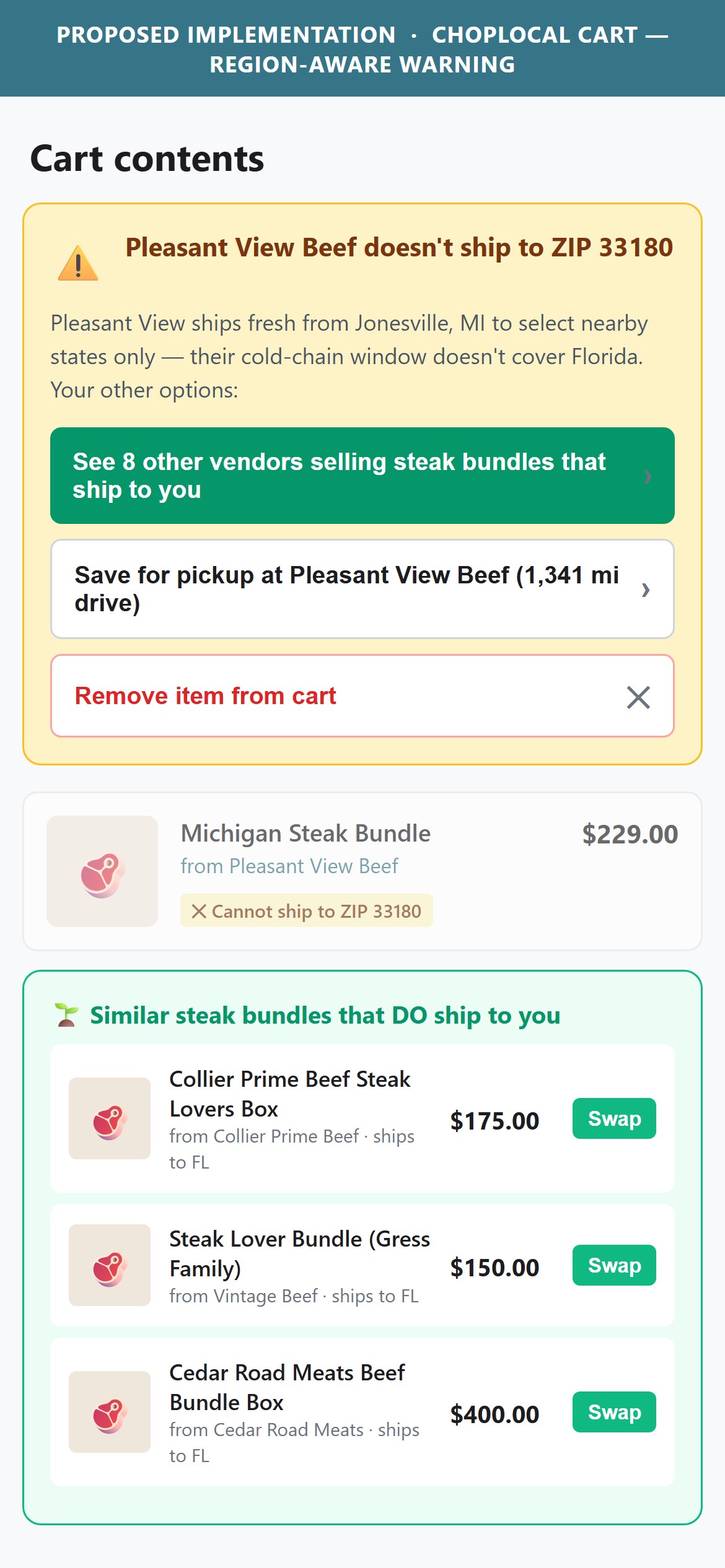
- When a shopper adds a product that a vendor will not ship to their address (e.g., Pleasant View Beef only ships to certain states), the cart drawer shows: *This product can not be shipped to your address — italicised, small, below the subtotal. That is it.
- The message does not explain WHY (some vendors ship only regionally due to cold-chain constraints — a real, defensible reason). It does not suggest ALTERNATIVES (but 8 other vendors ship this cut to you). It does not offer a PATH FORWARD (would you like to switch to a vendor that ships to your ZIP?).
- For a multi-vendor marketplace, region-restricted shipping is a structural reality — but the UX treats it like a small footnote instead of a designed moment. A shopper who hits this once with no resolution path is likely to abandon.
- This is a marketplace-native problem — Crowd Cow and Grass Roots handle it by showing Ships-to-your-ZIP filters at browse-time (preventing the cart-stage discovery) and offering vendor substitution when it does happen.
- In-cart: replace the small italicised asterisk with a clearly-designed warning card: yellow/warning colour, icon, explanation, and 2 action CTAs — Switch to a vendor that ships to me and Save for pickup at [nearest farm] instead.
- Browse-time prevention: add a Ships-to-your-ZIP toggle in the category filter — default ON. Products that do not ship to the current ZIP are hidden or greyed out with a pickup-only badge instead of being addable-then-rejected.
- For pickup-eligible products, show pickup-vendor location + distance next to the ATC on PDP — many buyers will not realise pickup is a real option worth the drive.
- Track how often this cart-stage rejection fires — if a meaningful share of ATC events end this way, invest in the browse-time filter first (higher leverage than fixing the cart message alone).
Technology Ecosystem
Technology stack assessment — installed tools vs recommended additions for CS-Cart Multi-Vendor stores
Present (13)
Missing (8)
App Stack Assessment
ChopLocal's app ecosystem is well-instrumented for paid media (Facebook, Google Ads, Pinterest, Bing, plus dual session-recording via Clarity + Mouseflow) but under-invested in the customer-side conversion layer. The four highest-priority gaps are: (1) dedicated reviews app — the native CS-Cart reviews framework is functional but the PDP shows no aggregate ratings or review counts, (2) a cross-sell / recommendation engine — cart and PDP both have zero cross-sell, leaving 20-30% of AOV on the table, (3) subscription infrastructure — meat is a natural subscription category and 5/10 top F&B stores have this, (4) a free-shipping progress bar to convert the already-advertised $75 threshold into an AOV nudge. Consolidating from two session recorders to one (Clarity is free) frees budget for one of these higher-leverage additions.
Confidential — Prepared for ChopLocal by Growisto | July 2026